Printer Error Codes Explained (HP, Canon, Epson, Brother)
Error codes look scary but sort into three buckets: fix-it-yourself in two minutes, fix-it-yourself in an hour, and call-a-technician. Here is which is which.
The two-minute fixes
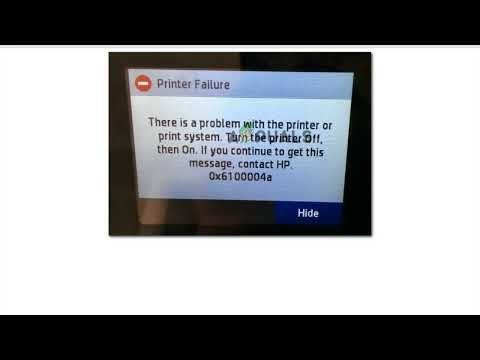
E/0-series codes (Canon), E-01 (Epson), and most "door open" messages mean exactly what they say: close a cover, clear the jam (see our paper jam guide), or reseat a cartridge. HP codes like 0x6100004a that appear after a jam or paper misfeed usually clear after a power cycle: turn off, unplug for 60 seconds, restart.
HP codes: 0x and E patterns
HP 0x-series codes are formatter/mainboard complaints. Rule of thumb: if a power cycle plus reseating cartridges clears it, it was a glitch. If the same code returns within a day, the formatter or a sensor is failing. E-codes on DeskJets are usually carriage stalls — check for obstructions on the rod and a dirty encoder strip.
Canon support codes (E + number)
Canon codes are the friendliest: the screen tells you the fix in plain language ("Paper output tray is closed"). The B200 series means the printhead has died — on cheap Pixmas, that is usually a new-printer moment; on Pro models, a repair.
Epson E-01, E-10, and E-90s
E-01 is a fatal internal fault (usually ink system or mainboard). E-10/E-91-style waste-ink-pad messages mean the internal counter is full — service mode resets exist, but the pads genuinely need replacement eventually, or ink overflows internally.
Brother: drum, toner, and "unable to print"
Brother messages are mechanical honesty: "Drum End Soon" means the drum unit, not toner — replace it and reset the counter (open front cover, hold OK). "Unable to Print XX" is usually a paper fragment or object in the path behind the rear door. "Toner Life End" on refilled cartridges needs the front-cover gear-reset trick.
When a code means stop
Repeated formatter codes, B200, E-01, any code with burning smell or leaking ink: power off and do not restart repeatedly — you turn a repairable fault into a fire or a soaked mainboard. Book a diagnosis instead.
Keep Reading
This is general guidance only. Summit Edge is not affiliated with, endorsed by, or an authorized support provider for any printer manufacturer.